
How to Absolutely Disable Woocommerce Coming Soon Mode
Since version 9.1, Woocommerce has had a “Coming Soon” mode. The feature makes sense, as it tries to help avoid you creating a store, but not finishing it, and thus people are trying to make purchases from your store yet you aren’t ready for them to do so yet.
Reasons for this could be plentiful, but perhaps you haven’t set up your payment gateway, shipping, taxes or just don’t have product ready to actually set yet.
It could also be useful to store owners who are just getting into Woocommerce, just as a reminder in the backend.
Code to Remove Coming Soon Mode from Woocommerce Programmatically
In any case, adding the following code to your functions.php file will remove it altogether.
// disable coming soon mode in Woocommerce

add_filter( 'woocommerce_coming_soon_exclude', function() {return true;}, 10 );

add_action(

	'admin_bar_menu',

	function ( $wp_admin_bar ) {

		$wp_admin_bar->remove_node( 'woocommerce-site-visibility-badge' );

	},

	100

);

update_option( 'woocommerce_coming_soon', 'no' );
What exactly does this do?
This first bit is directly from Woo’s Github, but it didn’t work at all for me. Leaving it for posterity, should they remedy the remedy to the ailment they caused.
add_filter( 'woocommerce_coming_soon_exclude', function() {return true;}, 10 );
This part will simply remove the “Coming Soon” or “Store Coming Soon” badge from your WP Admin area’s header.
add_action(

	'admin_bar_menu',

	function ( $wp_admin_bar ) {

		$wp_admin_bar->remove_node( 'woocommerce-site-visibility-badge' );

	},

	100

);
Finally, this just forces the option to be turned off every time the theme is loaded, including in WP Admin. This will absolutely ensure that no additional code is added to the front end of your site.
update_option( 'woocommerce_coming_soon', 'no' );
Wait? Code added to the front end of my site!
That’s right. Without the code above, I’m seeing this code added to my sites.
<link rel="stylesheet" id="woocommerce-coming-soon-css" href="https://website.com/wp-content/plugins/woocommerce/assets/css/coming-soon.css?ver=9.6.0" type="text/css" media="all">
Can I Just Turn This Off in Woocommerce?
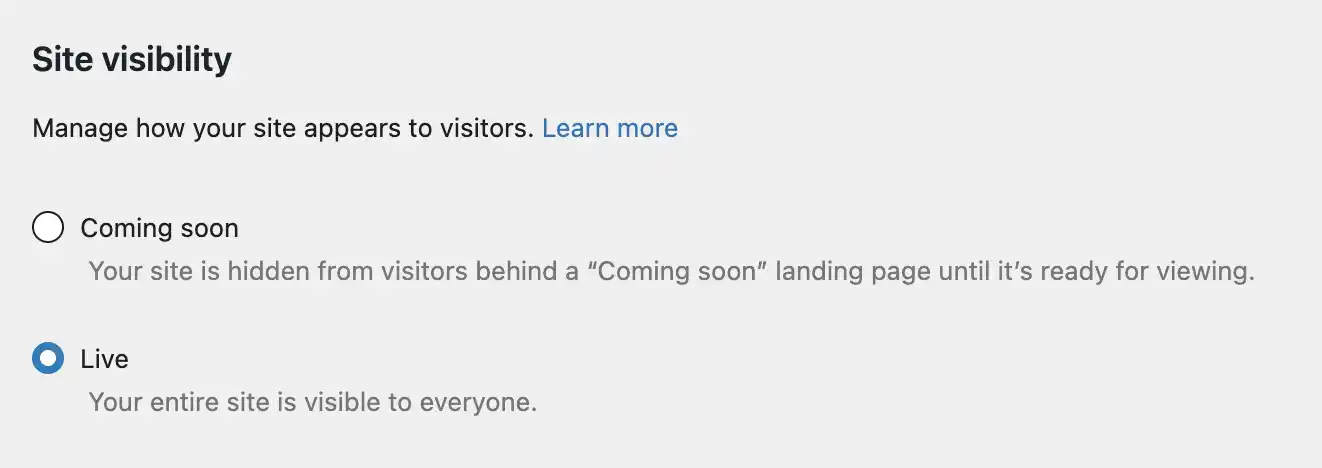
Of course. Just head to Woocommerce > Settings > Site Visibility and look for these options:
Up Next: How to Remove akismet-widget-style-inline-css from Your WordPress Theme